
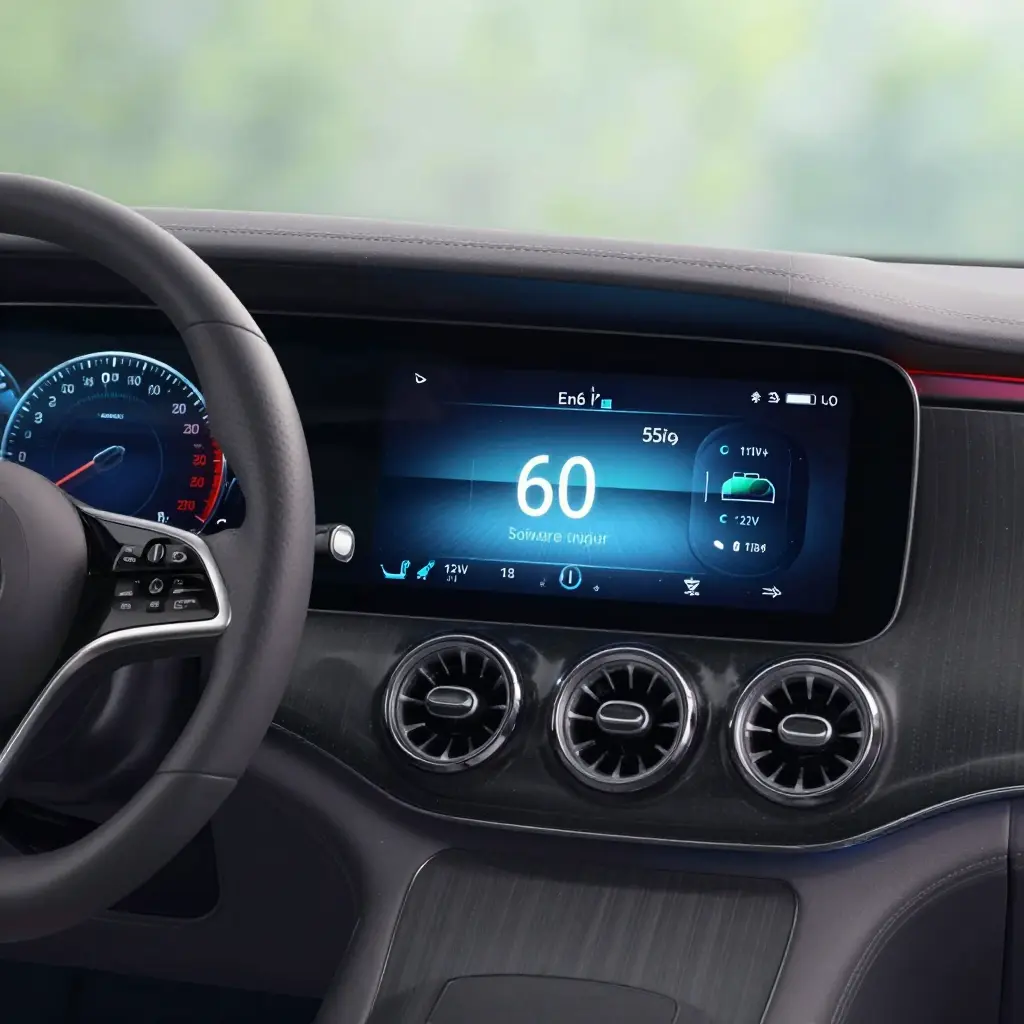
Mercedes EQS Software Update Stalls at 60 Percent: Why 12V Battery State and the Parked Sleep Cycle Are Usually to Blame
When a Mercedes EQS software update stops at 60 percent, the first suspicion is usually a corrupted firmware package. More often the cause is simpler: a sagging 12V battery, or a car that went to sleep in the middle of the install. The high-voltage pack drives the car; the 12V battery is what keeps the control modules awake while new code is written. Let its voltage fall far enough and the flash routine quits at its next checkpoint.
Who This Troubleshooting Guide Is For
This guide is for EQS owners watching a progress bar that will not move, for EV drivers who want to know how the low-voltage system governs over-the-air (OTA) and workshop updates, and for technicians seeing the same fault across the EQ range. Independent shops that work on European and luxury EVs will recognize it too, because the diagnosis is repeatable and saves both bay time and callbacks. DIY owners looking up reset and battery-support procedures for the EQS software platform can apply the same logic.
A stall that keeps coming back is rarely caused by the download. It tracks voltage and sleep state, and once you know the pattern you can test for it and fix it.
The Technical Mechanism Behind the 60 Percent Stall
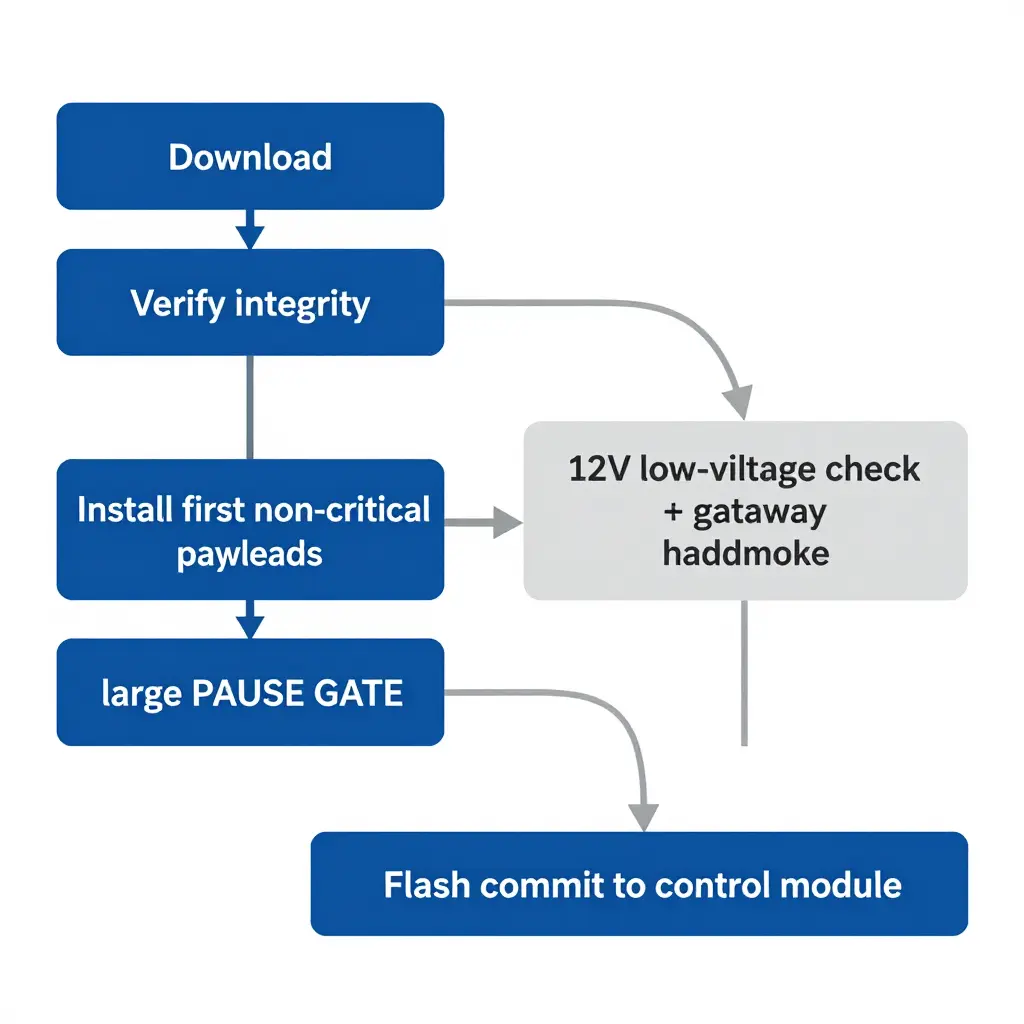
A 60 percent freeze is rarely a corrupted file. That figure is where the update orchestrator — the scheduling layer that runs each phase of the process — pauses on purpose. The car is not failing; it is waiting.
The Orchestrator Owns the Clock
The orchestrator does not stream one monolithic image to the whole car. It splits the update into verifiable payloads and commits them one target at a time. By the time the bar reaches 60 percent, the download, the integrity check, and the first rounds of non-critical programming have already succeeded.
The Staged Update Sequence
Programming follows a fixed order: telematics and infotainment first, then body and comfort electronics, then the safety- and drive-related nodes. The 60 percent mark falls just before the most sensitive control module targets are written, which is where verification overhead rises and voltage margins get tight.
The Gateway Handshake
Before a flash is committed, the central gateway re-establishes a handshake with each control module, confirming its identity, current software level, and bus stability. If a module answers late or reports a marginal condition, the orchestrator pauses instead of risking a partial write.
The Voltage Gate Before Flash
The supply requirement is the decisive part. A control module will not commit flash unless it is fed a stable low-voltage supply — the 12V rail held inside a tight window and backed by the auxiliary battery. During an OTA update, the parked sleep cycle can let that rail sag, so the orchestrator halts at the threshold and waits for conditions to recover. The documented behavior of Mercedes EQS software fits this: the gate is deliberate, not a defect.
Why It Resumes Cleanly
Once voltage and bus conditions satisfy the gate, the handshake completes and programming continues past 60 percent. The stall belongs to the safety logic, not to the file.
12V Battery State and Its Role in the Update
What decides whether an EQS update finishes is not the traction pack, the Wi-Fi signal, or server load. It is the 12V battery. During the flash window, the EQS gateway and its controllers run off the 12V system, not the drive battery; the high-voltage pack reaches them only through the DC-DC converter, which behaves differently when the car is parked and asleep. If the 12V supply sags at the wrong moment, the gateway can drop mid-write and leave a module in a state the car cannot recover on its own.
An EQS software update is therefore a low-voltage event dressed up as a high-voltage one. The terminal voltage of the 12V AGM battery, its state of charge, and its overall health decide whether the flash proceeds, pauses, or aborts.
Voltage thresholds and why they exist
The vehicle control unit samples terminal voltage continuously while programming. The gates are conservative on purpose:
- Above roughly 12.6V (near 100% state of charge): the update proceeds normally.
- Around 12.2V (roughly 50-60% state of charge, depending on the battery): this is the practical floor. Headroom is thin, so the car may pause the download or refuse to start the flash.
- Below 12.0V, and certainly below 11.8V: the update aborts to protect the modules rather than risk bricking them.
AGM behaviour under load
An AGM (absorbent glass mat) battery can hold a healthy surface voltage at rest and still droop quickly under sustained load. Programming keeps several controllers awake and writing, which is a steady draw. A battery that reads a comfortable 12.5V open-circuit can fall toward 12.0V once the flash starts, and that is when the update stalls. A marginal state of charge forces a pause because the system would rather stop cleanly and resume later than leave a module half-written.
DC-DC converter activity while parked
While the car is parked, the DC-DC converter does not run continuously. It wakes periodically to top up the 12V battery, then sleeps to save energy. If the update starts during a sleep window, or the converter’s maintenance cycle is interrupted, the 12V bus runs on stored energy alone, and any weakness there shows up immediately.
That, rather than a bad file, is what produces the pause-and-resume pattern owners report.
Before starting an update, test the 12V battery with a proper tester, bring it to full charge, and connect a stable support charger if there is any doubt. Keeping the 12V supply healthy is the cheapest insurance against a stalled flash.
12V Battery Voltage Across the EQS OTA Update Cycle
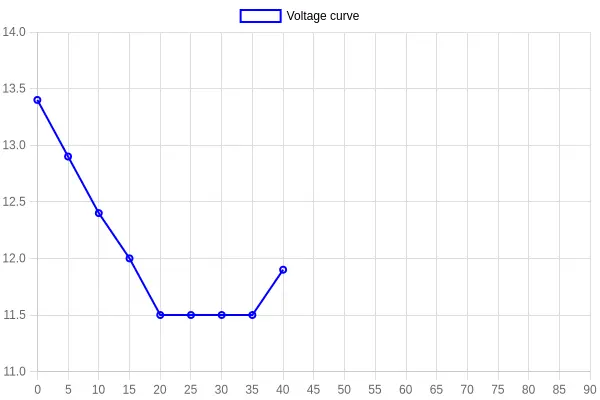
The chart below plots 12V battery voltage across a full EQS over-the-air update, from 0 to 90 minutes. The moment that matters is the 60 percent stall point, where the auxiliary battery falls below the required operating threshold and the update logic halts the flash to protect the control units.
How to Read the Chart
| Zone | Voltage Band | Meaning |
|---|---|---|
| Safe Zone | Above 12.5V | Battery healthy, update can proceed |
| Warning | 12.0V – 12.5V | Voltage sagging, monitor closely |
| Interruption Threshold | Below 11.8V | Update logic aborts the flash |
What the Curve Tells You
- 0-20 minutes (download): Voltage rests near 13.4V, then settles toward 12.9V. The car is still powered and the 12V rail sits comfortably inside the safe zone.
- 20-45 minutes (install prep): Voltage sags to roughly 12.4V as modules wake, checksums are validated, and the parked sleep cycle is interrupted again and again.
- 45-60 minutes (flash phase): A steady decline carries the rail through the 12.0V warning line toward the 11.8V interruption threshold.
- The 60 percent stall point: The annotated marker shows where voltage falls below the required threshold. Once the 12V rail can no longer hold 11.8V, the gateway halts the update and the progress bar freezes at 60 percent.
- 60-90 minutes (recovery): The curve flattens near 11.5V while the car sits, then recovers slightly as load drops and the converter stabilizes.
Why the 60 Percent Marker Matters
A freeze at 60 percent is almost never a software defect; it is a 12V battery state problem. A weak or deeply discharged auxiliary battery cannot carry the sustained load of the flash phase, especially when the parked sleep cycle keeps waking modules and drawing current. If your EQS stalls at this exact point, load-test the 12V battery and check the DC-DC converter and charging strategy before you retry. For model-specific update procedures and supported control-unit logic, see our Mercedes EQS software update resources.
Technician tip: Do not restart an interrupted EQS update until the 12V rail holds above 12.5V under load. Resuming on a sagging battery is how control units get bricked.
The Parked Sleep Cycle: The Hidden Gate Behind the 60 Percent Stall
An EQS software update does not run just because the car is switched off. For the session to resume, the vehicle has to complete its full idle and sleep sequence: door modules hand off, the data bus stops polling, and the high-voltage contactors open on schedule. The car has to actually fall asleep. When it cannot, the update hangs and looks frozen even though the download already finished.
Quiescent Current Draw Signals a True Sleep State
Once the ignition is off and every module has timed out, quiescent current settles to a low, steady value. That low number is the sign of a genuine parked sleep cycle. If current stays elevated, the network is still awake, and the update stays paused, waiting for a window that never opens.
The Module Wake/Sleep Handshake
Modules do not sleep in isolation; they negotiate. A wake/sleep handshake travels across the bus, and each control unit confirms it is ready to power down. The sequence cannot be skipped or rushed. Break the chain midway and the session never gets its green light to keep installing.
What Repeatedly Waking the Car Does
Open a door, move a key fob nearby, or connect a charger, and the handshake restarts and the network wakes. The update session then resets its own idle timer and waits again. Interrupt the car often enough and the install never finds the undisturbed window it needs.
Why an Interrupted Sleep Cycle Keeps the Update Frozen at 60 Percent
At roughly 60 percent, an over-the-air install moves from download into a module-side commit phase that needs a stable, undisturbed network. Without a completed parked sleep cycle, that commit cannot finalize, and the progress bar sits still: fully downloaded, never installed.
Sleep-cycle conditions the update needs:
- All doors, hood, and trunk fully latched
- Ignition off, with no key or fob activity nearby
- Charger disconnected and no scheduled climate or charging timers
- Battery voltage and quiescent draw within specification
- An undisturbed window long enough for the handshake to finish
Give the car that quiet window and the sleep sequence completes on its own, letting the update move past the stall point. Before you attempt a manual restart, check our Mercedes EQS software guidance for your model.
Troubleshooting Checklist to Clear the 60 Percent Stall
This checklist works through the two blockers that most often stop an EQS software update at 60 percent: an inadequate 12V battery and an incomplete parked sleep cycle. Do the steps in order and let each one finish before starting the next, so you isolate the real cause instead of chasing symptoms.
- Check the 12V battery. Measure the auxiliary battery with a calibrated multimeter. A healthy reading is at or above 12.6 volts; anything under 12.4 volts needs charging before you retry.
- Let the parked sleep cycle finish. Lock the car, walk away with the key, and leave it undisturbed for 15 to 30 minutes until every control unit powers down.
- Support the battery during the update. Connect the EQS to an AC charger and hold a stable state of charge, since the update aborts as soon as voltage sags.
- Restart the session cleanly. Reboot the infotainment system, re-enter the update menu, and start the download again rather than resuming a stalled transfer.
- Confirm the firmware committed. Once the bar clears 60 percent, check that the new version is registered in the system and log it for your service history.
For model-specific procedures, see the dedicated Mercedes EQS software resource before you begin.
With every step done, the update should move past 60 percent and finish committing. A successful outcome looks like this: the head unit reports the new version, the driver-assistance and charging modules reinitialize without error codes, and the car drives normally on the next cycle. If the stall returns even with a verified 12V battery and a full sleep cycle, the fault is likely in the backend server session or in a specific control unit, and the next move is a diagnostic scan with guided test plans.
Symptom, Cause, and Resolution Reference Table
A stall at 60 percent rarely points to a single fault. The 60 percent mark is where the head unit has finished downloading and starts verifying and staging the secondary firmware partition, which is also where the car is most sensitive to voltage stability and sleep-cycle integrity. The table below maps the usual symptoms to their causes and the corrective action a technician should take.
| Symptom | Likely Cause | Recommended Resolution |
|---|---|---|
| Update frozen at 60 percent for 30+ minutes | The head unit is waiting for a stability handshake from the 12V rail before it commits the staged image; the commit gate is not satisfied | Connect an approved battery maintainer, keep the ignition off, verify a steady 13-14V, then restart the update session |
| 12V battery voltage below threshold (typically under 12.2V at rest) | The auxiliary AGM/EFB battery is depleted because the high-voltage pack is not maintaining the 12V rail through long parked idle periods | Charge or replace the 12V battery, confirm state of charge, and maintain voltage before re-attempting the update |
| Sleep cycle repeatedly interrupted | CAN bus wake events from connected apps, door-handle sensors, or aftermarket accessories keep the car from reaching deep sleep | Remove phone chargers and OBD dongles, store key fobs away from the car, and disable remote polling apps during the update window |
| DC-DC converter not maintaining supply | The converter is not sustaining the 12V rail while the HV pack is idle, or a stored fault is limiting its output during the update | Run guided diagnostics in XENTRY to read converter fault codes, repair or replace as indicated, and retest rail stability |
| Session resume failure after retry | The staging partition was corrupted by the interrupted session, or the session token expired and cannot be revalidated | Clear the update session cache, power-cycle the head unit, and if it recurs escalate to a dealer-level reflash of the affected control unit |
Treat a 60 percent stall as a voltage-and-timing problem first and a software problem second, and move to deeper diagnostics only once the 12V supply and sleep behavior have been ruled out. Owners who want platform-specific behavior should check the EQS software update reference, which covers staging quirks worth knowing before booking service.
Diagnosing the Stall with XENTRY and Workshop Tools
Workshop-level diagnostics show what the car’s consumer interface hides. The EQS touchscreen gives you a stalled progress bar and a cheerful “update pending” message; XENTRY tells you why it stalled. When an update freezes at 60 percent, the consumer UI reports the symptom, while the factory diagnostic software exposes the supply voltage, the quiescent current draw, and the interrupted session logs underneath.
Read the Control Module Fault Memory
Start with the control module fault memory across the relevant ECUs, usually the central gateway and the head unit (HU). A flash session that failed or was abandoned tends to log a communication or voltage fault rather than a clean error. Read the events in timestamp order: a voltage sag logged mid-session usually lines up with the 60 percent freeze, because that is the phase where a module commits larger data blocks and draws peak current.
Monitor the 12V Supply and Quiescent Current
Next, watch the 12V supply under live load. During an update the car must not be allowed to enter its parked sleep cycle, yet a weak or aged 12V battery can still drag the rail below the minimum threshold and abort the flash. Use XENTRY live data plus a clamp meter to watch:
- Terminal voltage at the 12V battery under update load (aim for a stable, supported rail)
- Quiescent current draw before the session and during the sleep attempt
- Control module supply voltage reported live, versus the value captured at the moment of stall
- Charger and support voltage output while the update runs
- Any wake/sleep command transitions in the session timeline
Verify the Update Session Logs
Finally, pull the update session history. The logs show whether the module acknowledged each block, where the transfer dropped out, and whether a sleep cycle ended the session early. Comparing session timestamps against voltage data is where a repeatable pattern shows up.
Access is the obstacle for independent European and luxury EV shops. A Mercedes-Benz software upgrade subscription and a reliable STARCOM Professional diagnostic download let a shop do this work in-house without a dealer portal, and current downloadable Mercedes-Benz software keeps module coverage up to date, so the fault memory and live data above are actually readable on the platform the shop already owns.
What “Good” Looks Like
A healthy result is unremarkable: voltage stays supported throughout, quiescent current drops only after the session completes, and the session log shows every block acknowledged in sequence with no sleep interruption. When those three line up, the 60 percent stall is no longer a mystery but a documented fault you can fix.
Reading the Dependency Chain at a Glance
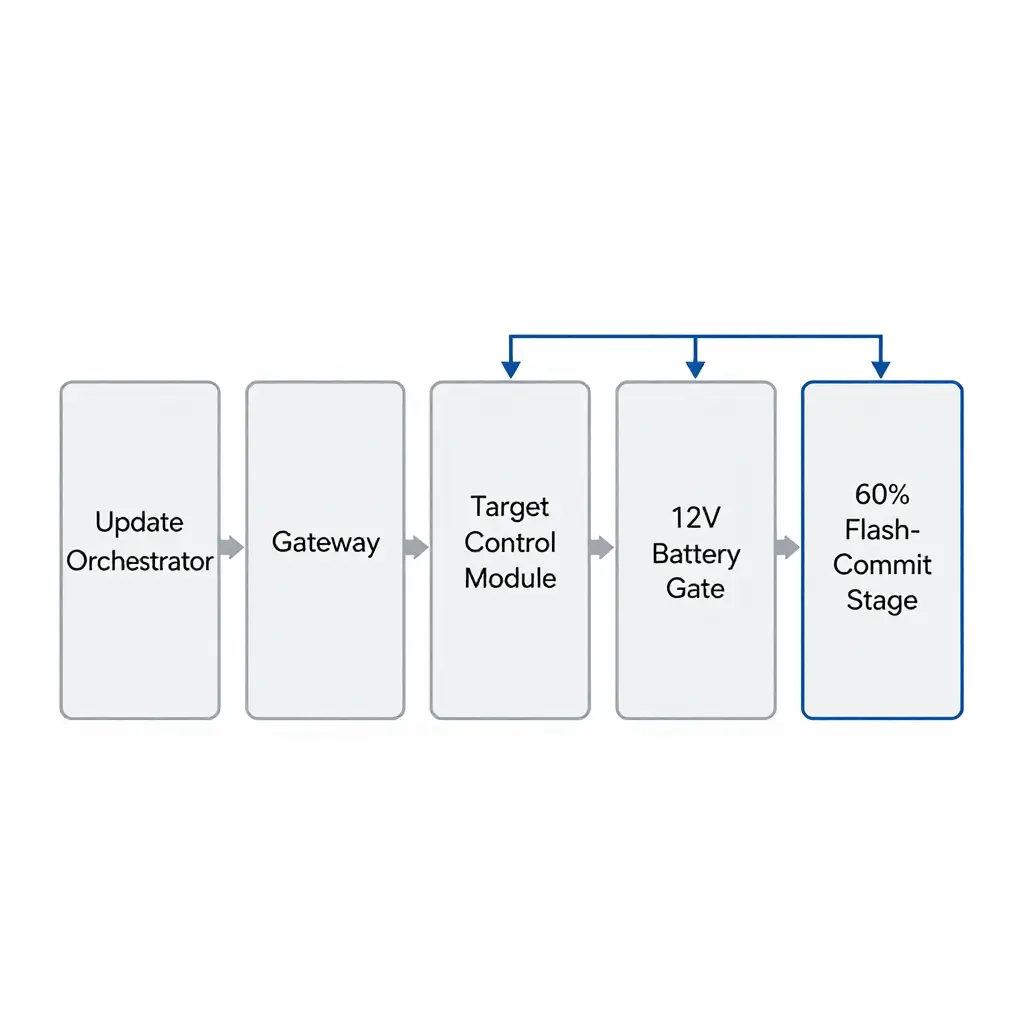
The schematic above traces how a single OTA push travels from Mercedes’ backend and where it can stop. The arrows show more than data moving forward; they show a dependency chain. If one link fails, everything downstream stalls, and the flash-commit stage parks itself at 60 percent.
The flow has five blocks:
| Block | Role in the OTA Update | Failure Impact |
|---|---|---|
| Update Orchestrator | Schedules and stages the package | Update never starts |
| Gateway | Routes data to the correct module | Package stalls mid-transfer |
| Target Control Module | Performs the actual flash write | Flash aborts or corrupts |
| 12V Battery | Supplies stable voltage | Commit refuses to complete |
| Sleep-State Gate | Confirms true parked-sleep state | Commit blocked until conditions met |
Why the 60 Percent Mark Matters
In most EQS OTA sequences, 60 percent is the flash-commit boundary. Up to that point the update is mostly download-and-stage work that tolerates voltage sags. Past it, the target control module starts writing to persistent memory, and that write needs an uninterrupted, stable 12V supply and a true parked sleep state. When the 12V battery drops below the 11.8V interruption threshold, or the car will not enter a genuine sleep cycle, the orchestrator halts rather than risk a bricked module.
The Two Hidden Prerequisites
Most owners watch the infotainment screen and miss the two quiet gatekeepers on the right of the diagram:
- 12V battery state of charge: a healthy, well-charged auxiliary battery is not optional. Aged or discharged batteries are the most common cause of a stalled commit.
- Parked sleep cycle: the car must be locked, undisturbed, and allowed to drop into deep sleep. Any wake trigger, from a proximity key to a telematics ping, resets the gate.
Understanding this flow is the fastest route to a clean update. For a closer look at how these sequences behave on the EQS, see this guide to Mercedes EQS software.
FAQ: Mercedes EQS Software Update Stalling at 60 Percent
Does a stall at 60 percent damage the vehicle?
Usually not. A stall at 60 percent is almost always a provisioning halt rather than a corrupted flash, and the control units stay recoverable because the update is staged and not yet committed. Scans after a stalled Mercedes EQS software update typically show no permanent DTCs, only pending communication faults that clear once the process resumes.
How long should the update actually take?
An over-the-air EQS update takes roughly 25 to 45 minutes of active install time. The visible 60 percent marker is where the head unit hands off to background ECU flashing, which can sit for several minutes before it moves. If the bar stays at the same percentage for more than 60 to 90 minutes, treat it as a genuine stall rather than normal dwell.
Does the 12V battery have to be replaced?
Not automatically. Load-test it first; a stall is usually triggered by a state of charge below about 80 percent, or a terminal voltage that sags under 12.2 V. If the battery holds above 12.4 V under load, recharge it and retry. Replace it only if the load test or conductance test fails.
Can the update be retried immediately?
No. Let a full parked sleep cycle finish first. Lock the car, leave the key fob well away, and let every module power down (15 to 30 minutes) so the gateway reinitializes. Retrying before the bus sleeps often reproduces the same 60 percent halt.
How should the parked sleep cycle be handled?
Set it up deliberately rather than waiting and hoping. Park on level ground, close all doors, disable scheduled departure and cabin pre-conditioning, and leave the charging cable disconnected unless you are told otherwise. Confirm the interior CAN bus has gone quiet before you restart. For staged ECU procedures, use Mercedes EQS software guidance to match the firmware revision to the vehicle build.
The 60 Percent Stall Points to Battery and Sleep State, Not a Broken Update
Everything above points to one conclusion: when a Mercedes EQS software update freezes at 60 percent, the update package is almost never the problem. The stall is a symptom; the underlying condition is the health and charge of the 12V battery, together with an interrupted parked sleep cycle.
The EQS keeps its control modules awake during an over-the-air (OTA) flash on the 12V system. When the auxiliary battery sags below its threshold, or the car fails to complete its parked sleep sequence, the handshake between the head unit and the modules breaks at the point of heaviest write activity, the 60 percent mark.
The pattern is consistent. Voltage dips line up with the pause, scans usually show no corruption in the downloaded package, and a car given a stable, fully charged 12V source and an uninterrupted sleep window tends to carry the same update through to completion.
For owners: before you blame the software, test the battery and give the car a clean, undisturbed parking cycle. For technicians: check the 12V battery and the sleep behavior first, then read the module data with the right Mercedes EQS software tools. Either way, the stall is a power and sleep problem, and treating it that way is what fixes it.